Autofocus
Hocus Focus replaces NINA's built-in autofocus engine with a star-detection-driven routine that sweeps the focuser, measures Half-Flux Radius (HFR) on every frame, fits a curve to the resulting V-shape, and moves to the modeled best-focus position. It is the same star detector you tune elsewhere in the plugin, now feeding a more careful curve-fitting and validation pipeline.
What it does, and why it is better
A focus sweep produces a set of (focuser position, HFR) points that form a V: sharp in the middle, bloated on either side. The job of autofocus is to find the bottom of that V. Hocus Focus improves on a plain minimum-finder in several ways:
- Multiple curve-fitting models. Hyperbolic (several asymmetric variants), parabolic, and trendline fits, each with a goodness-of-fit rejection gate (\(R^2\) or reduced \(\chi^2\)). See Hyperbolic Curve Fitting for the model formulas and when each applies.
- Hybrid model selection. At the end of a run every hyperbolic model is refit and the one with the least expected error for the best-focus position is kept, so each run self-selects its most trustworthy fit.
- Weighted fitting. Each point carries its own measurement uncertainty \(\sigma\) (the per-frame star-HFR scatter), and the fit can weight points by \(1/\sigma^2\) so a noisy point counts for less.
- Outlier rejection. An iterative two-tailed Grubbs test can drop points that do not belong on the curve (e.g. a frame ruined by a cloud or satellite). It removes nothing until you raise Max Outlier Rejections, which is 0 by default.
- Stability reporting. A leave-one-out (LOO) cross-validation estimates how much the best-focus position would move if any single point were dropped.
- HFR-improvement validation. An optional before/after check confirms the run actually made the stars sharper, retrying the run if it did not.
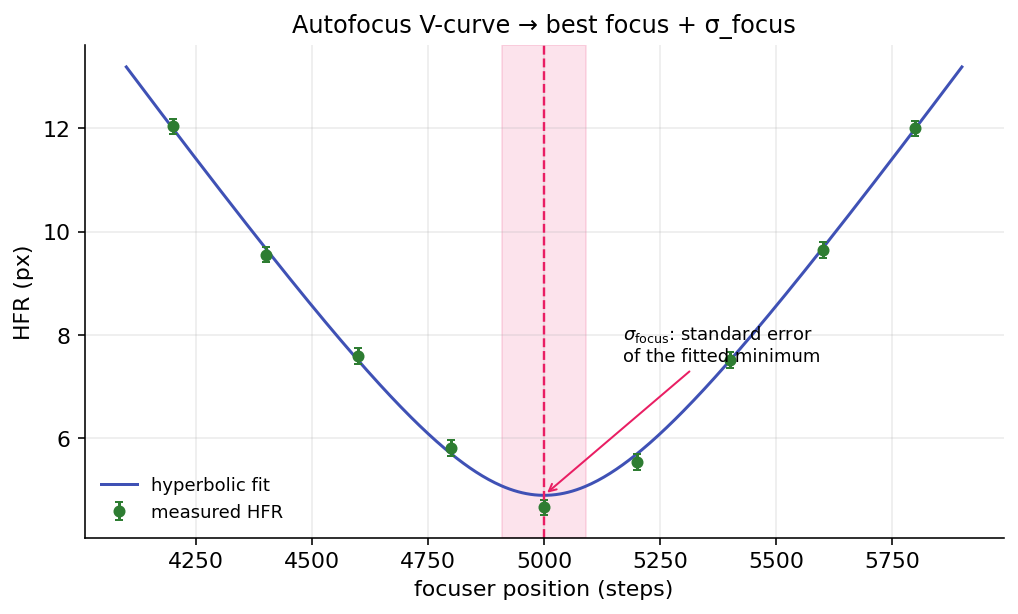 An autofocus run: measured HFR points form a V, a hyperbolic model is fit through them, and the fitted minimum (with its \(\sigma_{\text{focus}}\) error band) marks best focus.
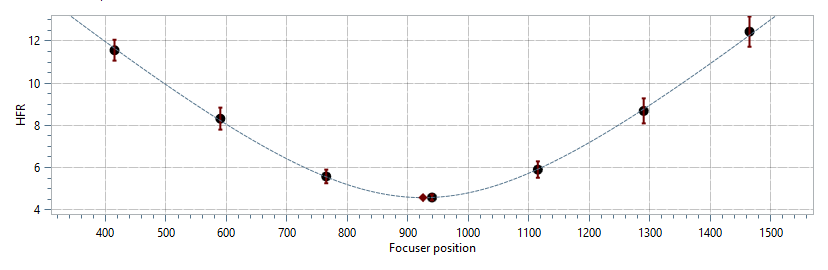
A real autofocus run: HFR versus focuser position with the hyperbolic best-fit curve.
The autofocus run, step by step
Setup. Temperature compensation and guiding are paused so focus and the image stay stable, the autofocus filter offset is applied if filter-wheel offsets are enabled, and the starting focuser position is recorded.
Initial HFR (optional). When Validate HFR Improvement is on, the engine first takes Frames Per Point exposures at the starting position and averages their HFR into the baseline InitialHFR.
Bracketing the minimum. The focuser moves outward by the configured offset-steps × step-size, then steps back inward. After each group of frames a trendline is refit to all points collected so far; the sweep continues until the trendline establishes a clear minimum with enough points on both sides, then queues whatever extra points are needed to reach the target count on each side of the V. Max Blind Steps Per Direction limits how far the sweep walks one way without bracketing focus. Any step that lowers the lowest measured HFR resets the count, so only steps that make no progress add to it; when the limit is reached the focuser returns to the starting position and the sweep walks the other way once.
Approach direction. By default the first points sit above the starting position and are reached by decreasing focuser moves, and the sweep keeps walking down until the low side of the V is measured. Reverse Initial Direction mirrors this: the first points sit below the starting position, are reached by increasing moves, and the sweep walks up first. Turn it on when your focuser's backlash compensation runs on decreasing moves, as is common on SCTs that focus by moving the primary mirror. Most moves in the run then avoid the compensation, and only the moves that fill in the far side of the V pay for it. The Optimization Wizard's live sweep follows the same setting.
Frames with no usable stars. When the detector finds no usable stars in a frame, that point measures an HFR of 0 and is left out of every fit. Failed points are also counted: when that count reaches the sweep's initial offset steps, the attempt stops walking that direction. With Max Blind Steps Per Direction above 0 it reverses once and keeps going; otherwise the attempt ends, NINA shows a warning, and the whole run is retried up to NINA's configured number of attempts. Longer exposures, or detection settings tuned for the defocused ends of the sweep, are the usual fix.
Per-point measurement. At each focuser position the engine collects Frames Per Point frames, runs star detection on each, measures HFR, and, when more than one frame is taken, combines them into a single point with an associated \(\sigma\). The fit is updated live as each new point arrives, so the chart fills in during the run.
Curve fitting (per update). Points are sorted by focuser position for reproducibility, their \(\sigma\) values are regularized (see below), and the selected model is fit. A trendline is always computed for the stopping logic; hyperbolic or parabolic models are fit once at least three points exist. The Grubbs outlier test then runs, and fitting repeats (up to Max Outlier Rejections rounds) until no further outlier is flagged.
Finalization. Once the sweep is complete:
- In Hybrid mode all four concrete hyperbolic models are refit on the final points (with consensus outlier rejection: only points that every solved model flags are removed). Fits whose minimum is non-finite or lies outside the sampled range are dropped, and a five-parameter asymmetric model stays eligible only if it beats the symmetric baseline on a nested F-test. Among the survivors the model with the smallest expected best-focus uncertainty is chosen. See The Hybrid selector.
- A leave-one-out stability pass refits with each point omitted in turn, reporting the spread of predicted best-focus positions.
- The final focus position is read from the chosen model: the hyperbolic/parabolic minimum, the trendline intersection, or (for the blended trend models) the average of the two.
- The fit is checked against the active rejection gate (\(R^2\) or reduced \(\chi^2\)) and confirmed to lie inside the measured sweep, an optional Focuser Offset is applied, and the focuser moves there.
Final validation and retries. With Validate HFR Improvement on, Frames Per Point exposures are taken at the final position and averaged into FinalHFR. The run passes only if
If it fails, the whole run is retried up to NINA's configured number of attempts. On success the engine writes an autofocus report (and, if Save is enabled, the images, star-detection results, and annotated frames), broadcasts the result, and restores temperature compensation, guiding, and the filter.
Note
Hocus Focus also supports per-region autofocus, detecting and fitting a separate curve for each image region. This underpins field-tilt analysis, where different parts of the sensor reach best focus at different focuser positions.
Reported metrics
| Metric | Meaning |
|---|---|
| HFR | Half-Flux Radius: the radius of the circle enclosing half a star's total flux, in pixels. Per frame it is the median HFR across detected stars; per point it is the average (or median) across Frames Per Point frames. Lower is sharper. |
| \(R^2\) | Coefficient of determination, 0–1; how well the model explains the measured points. Closer to 1 is better, and it is the default rejection gate for all fit types. |
| Reduced \(\chi^2\) | \(\chi^2\) per degree of freedom for weighted hyperbolic fits: \(\chi^2=\sum_i (r_i/\sigma_i)^2\) divided by \((N-p)\). A scatter-units sanity bound; see the caveats in the tooltip below. Recorded in the saved report and used by the rejection gate, but not shown as a panel row. |
| \(\sigma_{\text{focus}}\) | Standard error of the fitted minimum position, estimated from the hyperbolic fit's Jacobian; drawn as the horizontal error band on the best-focus marker. Degenerate (low-curvature) fits may report NaN. |
| LOO Std Error | Leave-one-out stability: the spread of predicted best-focus positions when each point is dropped in turn. It serves as a fallback for \(\sigma_{\text{focus}}\) when that is degenerate. Recorded in the saved report, but not shown as a panel row. |
| Stars detected (curve) | The fewest and the most stars found at any single focuser position the curve was fitted on. Points the fit discarded (outliers, and points outside the symmetric fit window) are left out, so the range describes the data the result rests on. Low counts mean the best-focus position will move more from run to run. |
Reduced \(\chi^2\) is not a calibrated test here
The per-point \(\sigma\) is the star-ensemble scatter, which overstates the uncertainty of the per-point median HFR. As the verbatim tooltip notes, reduced \(\chi^2\) "typically runs well below 1, shrinks as more stars are detected, and grows as Frames Per Point increases. Treat this threshold as a coarse sanity bound rather than a calibrated statistical test." It is only meaningful with weighted fits.
Key autofocus options
All tooltips below are quoted verbatim from the plugin UI.
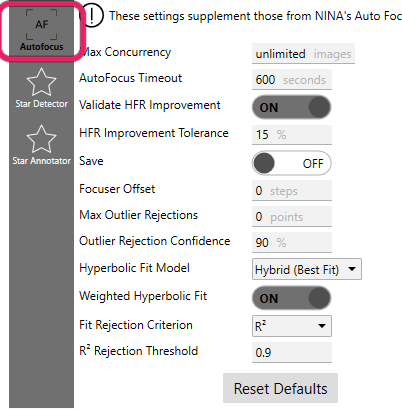
The Auto Focus tab supplements NINA's own auto-focus options.
| Setting | Default | Range | What it does |
|---|---|---|---|
| Max Concurrency | 0 | ≥ 0 | "The maximum number of auto focus images that can be processed at the same time. This is useful if processing time is much longer than exposure time and your system has limited memory or cores. 0 represents no limit." |
| AutoFocus Timeout | 600 | > 0 | "How long an Auto Focus operation can take before we cancel it and move on." |
| Validate HFR Improvement | On | — | "If enabled, takes an extra exposure before and after to ensure HFR improved. This check may be done in addition to the R² validation configured in NINA's Auto Focus options." |
HFR Improvement Tolerance (backing property HFRImprovementThreshold) |
0.15 | — | "How much wiggle room when validating HFR improvements. The default value of 15% means that the Auto Focus fails if the initial HFR is 15% or more better than the final HFR" |
| Hyperbolic Fit Model | Hybrid (Best Fit) | Symmetric / Tilted Hyperbola / Smooth Blend / Uneven Blend / Hybrid (Best Fit) | "Which hyperbolic model is fit to the focus curve. Hybrid (Best Fit) is the recommended default: the curve is rendered live with the Tilted Hyperbola, then at run completion every model is refit and the one with the least expected error for the best-focus position is kept — so each run self-selects its most trustworthy fit. The fixed choices: Symmetric is the classic 4-parameter hyperbola; the others are asymmetric (different slope on either side of focus, common because out-of-focus HFR behaves differently than in-focus): Tilted Hyperbola is a single smooth curve with a linear skew, Smooth Blend smoothly blends two hyperbolas, and Uneven Blend is the original blended fit." |
| Weighted Hyperbolic Fit | On | — | "Weights each point in the hyperbolic fit based on measurement error. σ values are regularized before fitting: a degenerate near-zero σ (e.g. from a frame with very few detected stars) is floored at 20% of the sweep's median σ, and an unknown σ gets the median, so no single point can dominate the fit through a degenerate error estimate." |
| Fit Rejection Criterion | R² | R² / Reduced χ² | "Which goodness-of-fit metric decides whether an auto-focus run is rejected. R² (default) keeps the existing behavior, rejecting when the fit's R² falls below NINA's R² threshold (Focuser settings). Reduced χ² instead rejects when the hyperbolic fit's reduced χ² exceeds the threshold below — a scatter-units goodness-of-fit bound for a focus curve, but it is only valid when 'Weighted Hyperbolic Fit' is enabled (it relies on per-point measurement σ). Quadratic and trendline fits always use R² regardless of this setting." |
| Reduced χ² Rejection Threshold | 5.0 | 0–1000 (0 disables) | "Upper bound on the hyperbolic fit's reduced χ² (χ² per degree of freedom) above which the run is rejected, when the rejection criterion is set to Reduced χ². … Treat this threshold as a coarse sanity bound rather than a calibrated statistical test. Set to 0 to disable. Meaningful only with weighted fits." |
| R² Rejection Threshold | from NINA | 0–1 | "The minimum R² (coefficient of determination) below which an auto-focus run is rejected, when the rejection criterion is set to R². This is NINA's own R² threshold from the Focuser settings; editing it here changes that same profile setting. R² closer to 1 indicates a better fit to the measured focus curve." |
| Max Outlier Rejections | 0 | ≥ 0 (0 disables) | "Controls the maximum number of points that can be rejected as outliers during Auto Focus curve fitting." |
| Outlier Rejection Confidence (entered as a percentage) | 0.95 | > 0.5, < 1.0 | "Confidence level for a two-tailed Grubbs statistical test of outliers to use during Auto Focus curve fitting. 95% is a reasonable default. Must be above 50% and below 100%." |
| Save | Off | — | "Saves details about every Auto Focus run, including a copy of the image, the star detection results, and the stretched annotated image" |
| Save Path | (empty) | folder | "The folder to save Auto Focus runs" |
| Focuser Offset | 0 | any | "Advanced Only! Moves the focuser this fixed amount at the end of an AutoFocus" |
| Max Blind Steps Per Direction | 8 | ≥ 0 (0 disables) | "Maximum number of blind AutoFocus steps attempted in each direction before reversing to try the other side. Set to 0 to disable the cap." |
| Reverse Initial Direction | Off | — | "Start AutoFocus below the current focuser position and take the initial measurements with increasing focuser moves, instead of starting above it with decreasing moves. Enable this when your focuser's backlash compensation fires on decreasing moves (common on SCTs that focus by moving the primary mirror), so most AutoFocus moves avoid it." |
When these help
- Leave Weighted Hyperbolic Fit on and Hyperbolic Fit Model set to Hybrid (Best Fit). Those are the defaults, and they let each run pick its most reliable model and discount noisy points; only the reduced-\(\chi^2\) gate depends on the weighting being enabled.
- Set Max Concurrency to a non-zero cap only if frame processing is starving memory or CPU on a slow machine; leave it at 0 (no limit) otherwise.
- Set a non-zero Focuser Offset only for a measured, repeatable focus bias in your train. It is an advanced-only fixed nudge applied after the calculated position.
Binning during autofocus
Two separate settings decide how many pixels an autofocus frame is measured on.
NINA's Auto Focus Binning (Options → Focuser, and per filter in the filter wheel settings) changes the capture: the camera returns a smaller frame with larger pixels. Set it to the binning you image at, so focus is found for the frames you actually shoot. Hocus Focus reads it back from the frame's metadata to compute pixel scale, and everything built on that scale uses the binned pitch, including the calibration in the Tilt Adapter Wizard.
Hocus Focus Detection Binning (Star Detector tab, default 1x1) does not touch the capture. It resamples the frame for star detection only, to bring star sizes into the range the detector is tuned for, and every HFR it reports comes back in the captured frame's pixels. It never changes itself: a line under the setting recommends a factor from your last measured in-focus HFR, and you choose. See Detection Binning.
The two multiply. If you raise Detection Binning while Auto Focus Binning is above 1x1, Hocus Focus explains the difference and offers to set the NINA setting back to 1x1. The recommendation already accounts for camera binning, so it backs off on its own when the camera is already binning.
Replaying and reviewing a run
The Auto Focus panel in NINA's Imaging tab carries three controls of its own, below the chart.
Replay Saved AF re-runs the analysis on a run you saved earlier, with no hardware involved. Point it at the
AutoFocus_<date>_<time> folder, or at the attemptNN folder inside it when a run needed more than one attempt.
If the saved run recorded the settings it was captured with, a prompt asks how to replay it:
- Use current settings: replay with your current profile's detection and AutoFocus settings.
- Use the captured settings (don't change my profile): replay with the settings from when the run was captured, held in memory only.
- Update my profile to the captured settings: overwrite your profile's detection, AutoFocus, and ROI settings with the captured ones, then replay.
Keep frames for review keeps every frame of a run started from this panel in memory so you can look at it afterwards. It is off by default and applies only to runs started here: auto focus during an imaging sequence never keeps frames. The frames are released when you start another run or close the review window. With Fit PSF enabled on the Star Detector tab, a run kept for review also fits PSF models, which a normal auto-focus run skips for speed; the HFR points are the same either way.
Review Frames opens the review window on the last run started from this panel, one frame at a time: the frame with its detected stars drawn to your Star Annotator settings, the focuser position, Detected stars, and the frame's median HFR (its mean, if Measurement Averaging is set to Mean + Outlier Detection). It is the fastest way to see which frame of a sweep came up empty, and what the detector made of the rest.
How it uses the star detector
Every HFR measurement comes from the same Hocus Focus star detector documented in Star detection, run with autofocus-specific overrides:
- Profile-driven parameters. Sensitivity, noise reduction, and the brightest-stars count are taken from NINA's profile (Image and Focuser settings), and the run is flagged as autofocus mode.
- Region of interest. When NINA's inner-crop ratio is below 1 and the camera is not subsampling, detection is restricted to that central crop; otherwise the full frame is analyzed. If the camera supports hardware subsampling with the inner crop enabled, the engine reads out only that central rectangle.
- Per-region detection. For multi-region runs the detector measures HFR only inside each region's boundary, and the per-region results are saved separately.
- Replay with cache reuse. When replaying a saved run, the engine can reuse the cached star-detection result if the detector version and region key still match, falling back to fresh detection otherwise, so you can re-fit a curve with new options without re-running hardware. Replay decodes the saved frames deterministically (concurrent image loads are serialized), so a re-fit reproduces the same per-position HFR every time rather than occasionally pairing two positions with an identical value.
- The measurement. From each detection it takes the median HFR (
AverageHFR) as the point value and the per-star HFR standard deviation (HFRStdDev) as the measurement \(\sigma\) fed into the weighted curve fit.
Because detection quality directly drives the HFR points (and therefore the curve and the chosen focus position), the Star Detection Optimizer tunes the detector specifically against autofocus runs, and its recommended step size sets how far apart to space the sweep points so the V is well sampled on both sides.