Overview & Features
Hocus Focus is a plugin for NINA that provides improved star detection, star annotation, autofocus, and tilt correction. It replaces or augments NINA's built-in star handling and autofocus routines with a more accurate star detector, a fully customizable annotator, a concurrent autofocus engine, and an aberration inspector that measures backfocus and sensor-tilt errors.
The plugin is deliberately modular: the star detector, the annotator, and the autofocus engine can each be enabled independently, so keep whichever pieces you like and leave the rest on NINA's defaults. The features are wired in under Options → Imaging → Image Options, where installing the plugin adds Star Detector, Star Annotator, and Auto Focus dropdowns; select Hocus Focus in each to turn that feature on.
Requirements
Hocus Focus targets NINA 3.2.0.2001 or newer (the plugin's declared MinimumApplicationVersion). The Aberration Inspector in particular requires that Hocus Focus is selected for both Auto Focus and Star Detector.
The four feature areas
Star Detection
The improved star detector measures each star's HFR empirically from a robust, gradient-aware background fit, so HFR does not depend on PSF modeling. On top of that it can fit a point-spread function (PSF) to each star (Gaussian and Moffat profiles are supported, with Moffat 4.0 the default) to report per-star eccentricity and FWHM. A star whose PSF fit fails the goodness-of-fit gate keeps its empirical HFR and reports no FWHM or eccentricity. When parameters are set well, the result is a lower HFR standard deviation across a frame, because cleaner detection and measurement reduce scatter. See Star Detection for the full detection pipeline.
Star Annotation
The annotator controls how detected stars are drawn on top of an image. It offers customizable colors and fonts for the star overlays, and it can reload annotations dynamically without re-running star detection, so you can restyle the overlay or change what is shown without paying for another detection pass. See Star Annotation.
Autofocus
The Hocus Focus autofocus engine analyzes each exposure while the next focus point is being exposed, which can make it faster than NINA's built-in autofocus engine. It can save AF runs (the images and the annotated star detection) so a run can be replayed later with different settings. The concurrent design is especially valuable with the Hocus Focus star detector, which is more resource-intensive than the built-in one. See Autofocus.
Tilt & Aberration Inspector
The inspector estimates backfocus and tilt errors by running an autofocus and computing AF curves for the center and corner regions of the sensor, split into a 3×3 grid. The result is a full sensor tilt and curvature model, which lets it measure backfocus error even when tilt is present. For single exposures it also generates FWHM contour maps and eccentricity vector fields for a quick visual read, offers a 3D visualization of sensor tilt, and can replay saved AF runs. See Tilt & Aberration Inspector, Sensor Model Fitting for how the tilt and curvature model is fit, and the Tilt Adapter Wizard for turning a measured tilt into concrete screw adjustments.
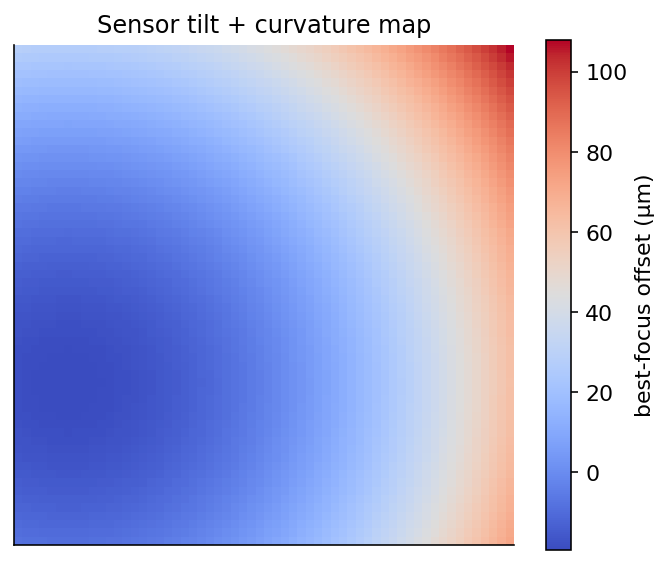 The Aberration Inspector models how best-focus position varies across the sensor, separating uniform backfocus error from tilt and field curvature.
The camera simulator
Alongside the four feature areas, the plugin ships a camera simulator: a synthetic camera that renders physically realistic star fields from an ASTAP star database, complete with defocus, donut stars, and injectable sensor tilt. Connect it in place of a real camera to exercise everything above in the daytime, from a first autofocus run to a full tilt-calibration rehearsal. See Camera Simulator.
Simple vs Advanced configuration
Hocus Focus is simple to configure by default, with two ways to go further. There are three levels of control:
| Level | Who it's for | What you do |
|---|---|---|
| Simple | Most users | Accept the Simple-mode preset defaults and let the detector adapt to your image scale. |
| Optimization Wizard | Anyone whose rig the presets do not suit | Let the optimizer search the parameter space against an objective function using your own saved AF runs, then apply the result as your Simple-mode settings. |
| Advanced | Experts setting each parameter by hand | Open Advanced settings to hand-tune individual detection, gating, and PSF parameters. |
Start at the Simple level: the defaults are a reasonable starting point, and higher accuracy (lower HFR standard deviation) comes from setting parameters well. When the presets are not finding enough clean stars on your rig, run the Optimization Wizard next rather than hand-tuning. Reach for Advanced mode only when you want to set a specific parameter by hand.
When to go beyond Simple
If detection already finds plenty of clean stars and your autofocus curves are tight, the defaults are doing their job; leave them alone. The Optimization Wizard, and after it Advanced tuning, pay off when a particular setup (unusual pixel scale, heavy nebulosity, persistent false detections, or bloated defocused stars) is tripping up the defaults.
For the full per-setting reference, see Settings. To have those settings tuned automatically against your saved runs, see the Optimization Wizard.