Hocus Focus
Hocus Focus is a plugin for NINA (Nighttime Imaging 'N' Astronomy) that provides improved star detection, customizable star annotation, a concurrent autofocus engine, and a tilt / aberration inspector that measures backfocus (the spacing between the corrector/flattener and the sensor) and sensor-tilt errors. It measures HFR with an accurate, gradient-aware star detector and fits PSF models to stars for eccentricity and FWHM measurements. It also builds a full sensor tilt-and-curvature model so you can quantify and correct aberrations across the field.
New here? Start with the Quick Start
The Quick Start walks you from a fresh install to a tuned autofocus setup: get a first run working, save your runs, tune star detection against a saved run, and know exactly what to share if you need help. It links to the deeper reference pages as you go.
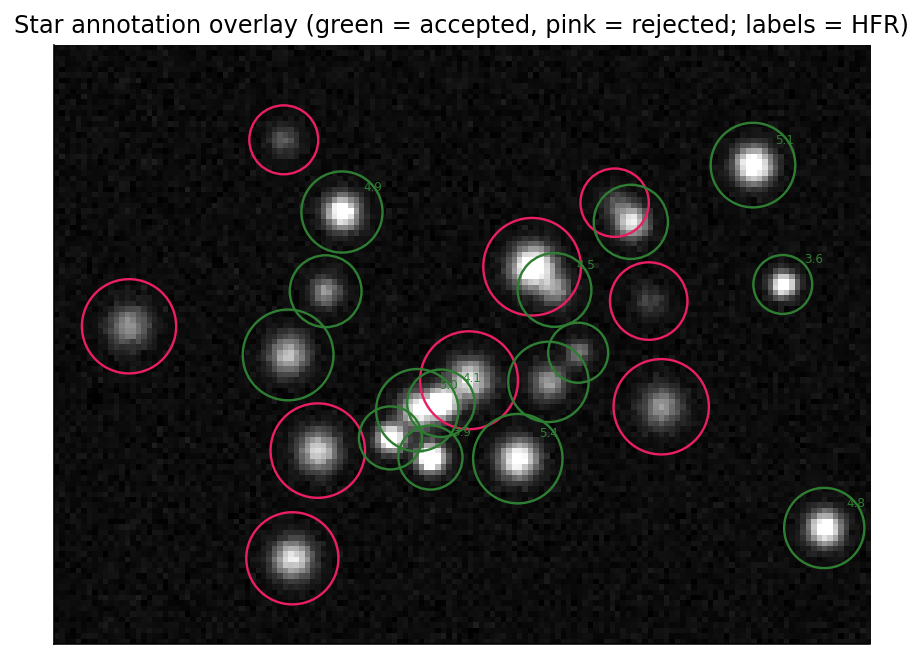
Hocus Focus star detection: accepted stars (green) carry an HFR label, while rejected candidates (pink) are marked by the gate that excluded them.
Key features
- Improved star detection — gradient-aware HFR measurement plus optional Gaussian and Moffat 4.0 PSF fitting for eccentricity and FWHM, with simple defaults and an advanced mode for fine tuning.
- Customizable star annotation — configurable colors and fonts, with dynamic reloading of annotations without re-running detection.
- Concurrent autofocus — analyzes exposures while the next focus points are still being captured, and can save and replay AF runs with different settings.
- Tilt / aberration inspector — generates a sensor tilt and curvature model, measuring backfocus error even in the presence of tilt, plus FWHM contour maps and eccentricity vector fields.
- Camera simulator — a synthetic camera that renders physically realistic star fields from an ASTAP star database, with defocus, donuts, and injectable sensor tilt, so autofocus and tilt correction can be tested and rehearsed in the daytime.
Mix and match
The star detector and the annotator can each be enabled independently; keep whichever pieces you like. To enable the autofocus and aberration-inspector features, Hocus Focus must be selected for both Auto Focus and Star Detector.
Installation
Hocus Focus is published through NINA's in-app plugin manager: open Plugins → Available, find Hocus Focus, and install it. To turn on its features afterward, go to Options → Imaging → Image Options and select Hocus Focus in the Star Detector, Star Annotator, and Auto Focus dropdowns.
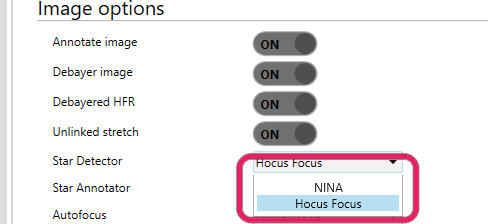
Switch NINA to Hocus Focus in Options, Imaging, Image Options.
Minimum NINA version
Hocus Focus requires NINA 3.2.0.2001 or newer.
How this documentation is organized
- Quick Start — the recommended first-run path: get autofocus working, save your runs, then tune star detection from a saved run.
- Overview — a tour of star detection, annotation, autofocus, and the tilt / aberration inspector, with the concepts and figures behind each.
- Star Detection Settings — a complete reference for every star-detection setting: what it does, when it helps, and when it can hurt.
- Star Detection Optimization — how the Optimization Wizard works: the objective function, the search algorithm, and how each setting factors in.
License and source
Hocus Focus is provided 'as is' under the terms of the Mozilla Public License 2.0 by George Hilios (jokogeo). The source code lives at github.com/ghilios/hocus-focus.
Getting help
Questions are welcome in the #hocus-focus channel on the NINA Discord server.