Star Detection Optimization
Hocus Focus exposes around 30 star-detection knobs: brightness sensitivity, noise and star clipping, structure layers, distortion and centering gates, hot-pixel handling, and more. Tuning them well for a given optical train, camera, and sky is expert work, and the payoff that matters is autofocus reliability: cleaner star measurements produce a tighter HFR-versus-focuser curve and therefore a more repeatable best-focus position. Left to guesswork, the defaults are rarely the best choice for your rig.
The Star Detection Optimization Wizard automates that tuning. It searches for the detection settings that make your stars trace the cleanest, most repeatable focus V-curve, working from a set of autofocus frames: either a run you saved earlier or one it captures live. Because the wizard scores settings by the quality of the focus curve they produce (not by any single hand-picked metric), it optimizes the whole detection pipeline against focus repeatability rather than a proxy for it.
The wizard launches from the top of the Star Detector tab. Its optimized settings are stored separately from your presets and are activated by a single Simple-mode toggle ("Use Optimized Settings") that only appears once a run has succeeded. Nothing is overwritten until you confirm, and the toggle is fully reversible.
What the wizard does
The wizard drives a derivative-free search engine, the StarDetectionOptimizer. The
same engine runs in the live wizard and in the offline TestApp optimize harness, so results are
reproducible and the optimizer can be exercised without launching NINA.
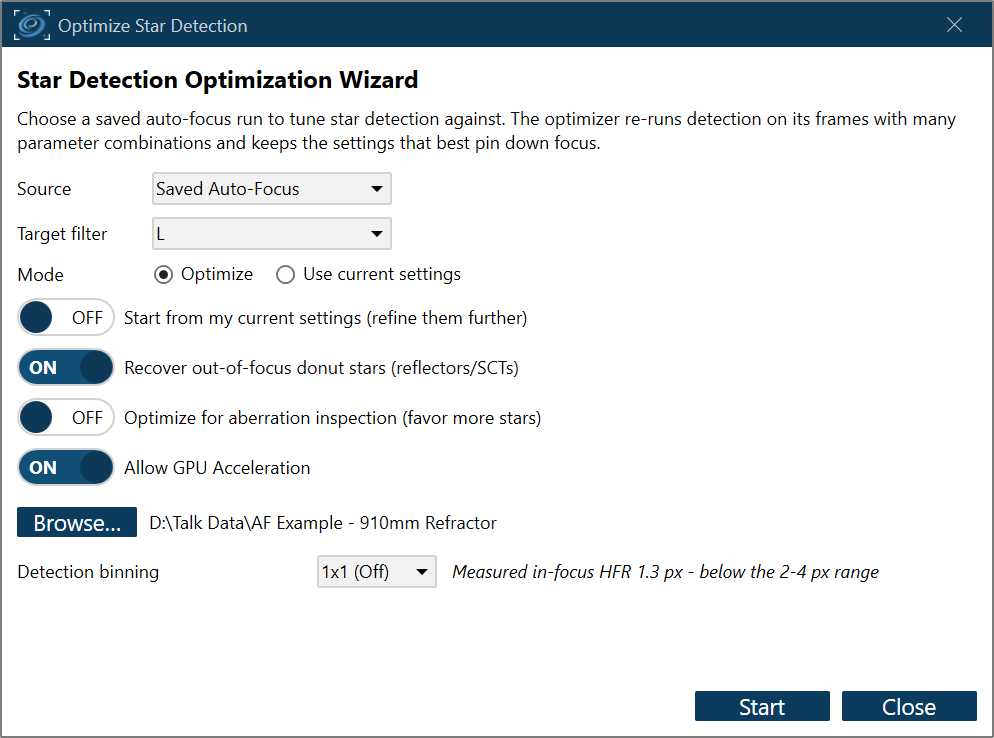
The wizard's start page: choose a saved autofocus run and the optimization objectives.
The high-level loop has three steps:
- Seed from the defaults, measure against your current settings. The optimizer starts its search from the fully-default detection parameters (built through the autofocus detection path, with PSF modeling off and the full-frame region set) rather than from your current settings, so a search that has drifted into a poor corner is not anchored there. Improvement is always reported relative to your current settings: the "before" number you see is what your rig does today. If you would rather refine your current setup in place, enable "Start from my current settings" on the start page to seed from those instead. Either way the wizard never hands back a result worse than your current settings: if the search cannot beat them, it returns them unchanged.
- Search. A staged compass/pattern search explores a curated set of detection parameters, evaluating each candidate against your saved run.
- Apply the best. On confirm, the winning parameters are written into the live properties and a recommended autofocus step size is offered alongside them. From the summary you can press "Continue optimizing" to run another pass seeded from the result so far (up to three passes total; the summary then shows the full Current → R1 → R2 → R3 trajectory).
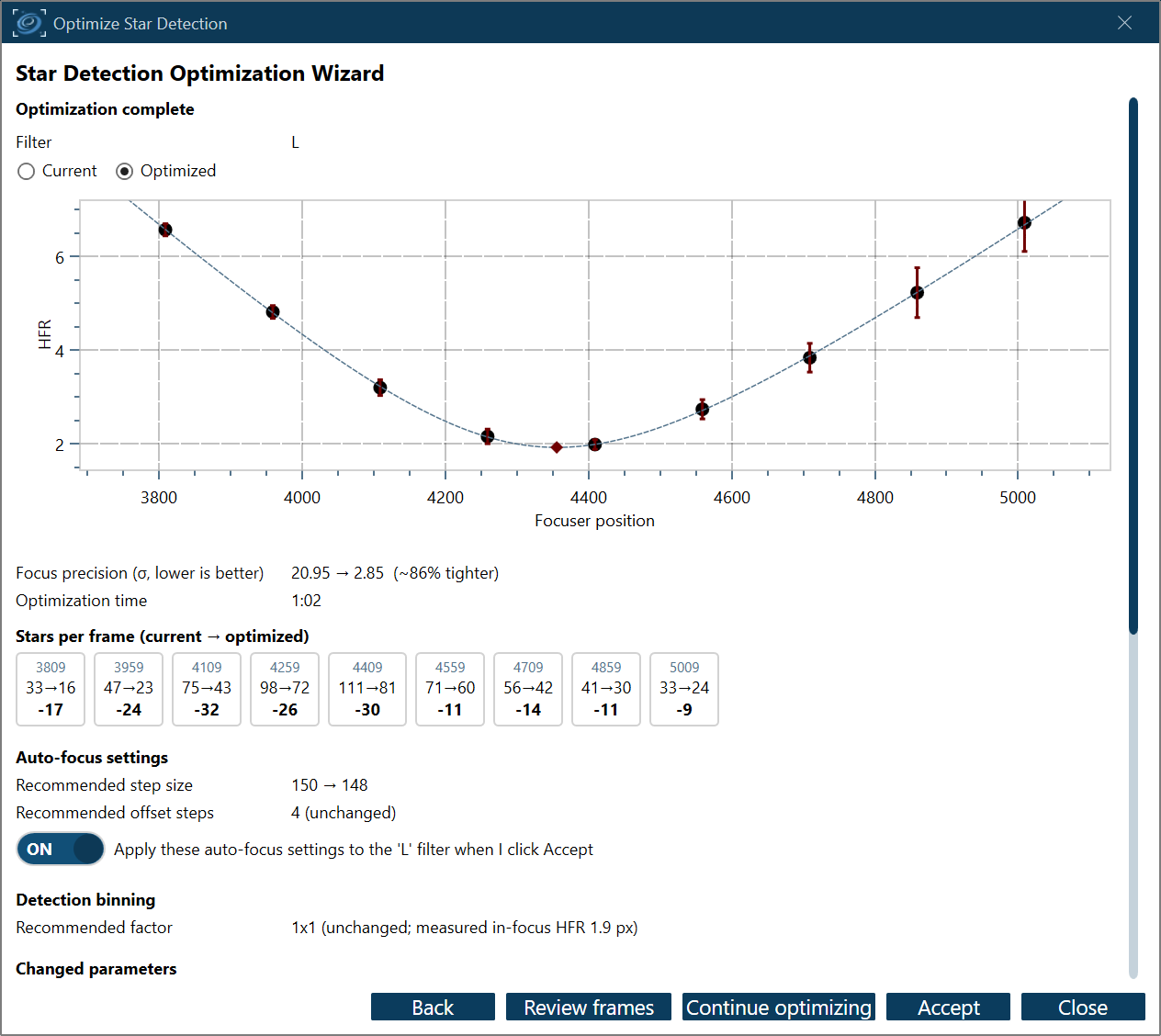
The summary shows the resulting focus curve, focus precision, and a recommended autofocus step size.
When the search lands Brightness Sensitivity at the bottom of its range, the summary also shows a Star signal block above the recommended step size: the detector had to accept almost anything above the noise to find stars at all, so the focus result rests on low-confidence detections. From those same measurements it works out how much longer an exposure would put a healthy population of stars above the default gate instead. See Exposure recommendation for the derivation, its caps, and what a Live sweep versus a saved run each let you do about it.
The summary also reports a recommended detection binning. The search holds Detection Binning fixed, but it reads the in-focus HFR off your fitted focus curve and reports the factor that implies.
The recommendation only appears when the fit is sound (R² of at least 0.9). A sweep that runs far enough out that the detector loses the defocused donuts reports compact noise blobs instead, and those drag the fitted minimum well away from the truth.
If the measurement calls for a different factor, the only action offered is Optimize again at NxN. It repeats the search at that factor on the frames already captured, with no new exposures and no focuser movement. Nothing is written until you Accept the new result, which applies the factor and the settings tuned at it together; the factor is never applied on its own, because settings tuned at one factor are not valid at another. You can always accept the run as it stands instead.
Optionally, you can label a handful of hard frames (missed stars, false positives) to add a recall/precision term to the score (recall = the fraction of real stars recovered; precision = the fraction of accepted detections that are real). This term is decisive for dim or bloated, out-of-focus "donut" stars that the raw star count barely reflects.
Two start-page objectives: autofocus vs aberration inspection
By default the wizard optimizes for autofocus repeatability (the objective below). Turning on Optimize for aberration inspection instead reweights the objective toward recovering many more stars across the whole frame (what the tilt / curvature model needs), while a fit guard keeps the focus curve usable. The "Recover out-of-focus donut stars" toggle (the donut-detection master switch) is also on the start page; enabling it lets the optimizer tune the defocus-aware settings and uses a larger evaluation budget, since it has more knobs to explore.
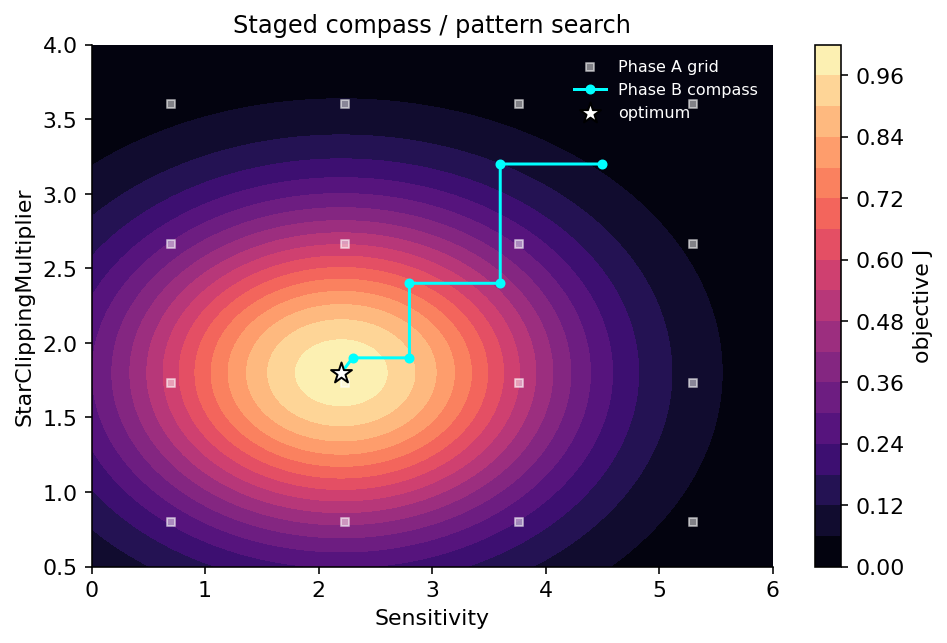
The search begins at the seed (the default settings, or your current settings if you choose) and walks the parameter space one coordinate move at a time, accepting only moves that improve the score and refining its step size as it homes in on a maximum.
Saved and live sources
The Source dropdown on the start page sets where the wizard gets its frames.
Saved Auto-Focus replays a run you saved earlier. (Autofocus saves its frames when Save is enabled in the Hocus Focus auto-focus options.) Point the wizard at the run's folder and it re-detects those frames with every candidate setting. Use it when you already have a run that focused well and want to improve your detection settings.
Live Auto-Focus captures a fresh set of frames now and optimizes those. Use it when your current settings cannot build a focus curve yet, so you have no usable saved run to replay. That is common with faint narrowband stars, heavily defocused donuts, or a new filter. A normal autofocus would fail here for the same reason detection is failing, so the wizard instead sweeps the focuser across a fixed range and saves every frame, whether or not it finds stars. It then searches those frames for settings that do build a clean curve.
A live run goes like this:
- Reach rough focus manually. A Bahtinov mask or a careful manual pass is fine. The sweep centers on the current focuser position, so it has to start near focus.
- Choose Live Auto-Focus, set the Exposure, and choose the folder to Save captured frames to. The camera and focuser must be connected, and Start stays disabled until you pick a save folder. The panel also shows the step size, capture binning, filter, and gain the sweep will use; these come from your profile's auto-focus settings. Focus recovery (extra steps/side) is editable and defaults to 1. Each recovery step widens the captured sweep by one extra focuser step on each side, so the curve can still bracket focus when you start well off it. Those outer frames are down-weighted in the fit and exempt from the star-count requirements. Set it to 0 to capture exactly your profile's sweep. Number of points and Total frames follow from the widened sweep, and Estimated time multiplies those frames by the exposure you set here; the estimate counts exposure only, not downloads or focuser moves. Detection binning can also be changed here; the whole search is tuned at whatever factor is in effect when the run starts (see Detection Binning). A Replay run has the same control.
- Press Start and confirm the telescope is roughly focused when prompted. The wizard moves the focuser out and steps back across the range set by your profile's auto-focus step size and offset steps plus the recovery steps, saves a frame at each point, then returns the focuser to where it started. The sweep does not try to converge, so it captures a full set of frames even when the current settings detect nothing. If the outermost positions come back starless and no focus curve can be fit at all, the wizard widens the recovery exemption far enough to leave those positions out of the curve, optimizes on the rest, and says so on the page.
- From there the run behaves like a replay: the frames are optimized and the summary appears.
Make the exposure long enough for the wings of the sweep
The optimizer needs stars all the way out to the defocused ends of the sweep, so pick an exposure long enough to keep them visible there. Narrowband filters often need a longer exposure to start. Once a live run succeeds, shorten the exposure and run it again to find how far you can push it (see the Quick Start narrowband section).
On the summary, a live run adds an Exposure row beside the recommended step size, and the Apply these auto-focus settings to my profile when I click Accept checkbox covers it: turn it on to adopt the sweep exposure as your auto-focus exposure time, so you focus with the exposure you optimized against.
Optimizing one filter
With per-filter star detection enabled, the start page adds a Target filter dropdown for both sources, defaulting to the filter currently in the wheel. The whole run is about that one filter: the baseline and the "Start from my current settings" seed come from its settings set, the filter and gain readouts on the start page show the target filter (not the profile's designated autofocus filter), and Accept writes the winning settings into the target filter's set, including the recommended step size and offset steps, which go to that filter's sweep override rather than to the profile. Optimizing one filter therefore no longer overwrites the sweep every other filter uses. A live sweep's exposure goes to the same filter too, written to NINA's own per-filter Auto Focus Exposure Time. The checkbox names the filter it will write to, and the step size and offset steps shown on the confirmation page are the ones that filter will actually sweep at, marked as an override where one is set. The Star Detector options switch to the filter you just optimized, so what you see there afterward is what the run produced.
A target filter must be selected before the run can start. A live run additionally requires the filter wheel connected: Start moves the wheel to the target filter and sweeps on exactly that filter, using its per-filter autofocus binning, gain, and offset, and at that filter's own sweep step size and offset steps if you have set them (see auto-focus sweep for one filter). Exposure is still whatever you set on this page. The usual switch to the profile's designated autofocus filter is skipped, and the wheel stays on the target when the sweep finishes. A replay needs no equipment, so you can work through your saved runs and optimize each filter in turn without connecting anything.
How a candidate is scored
For each candidate the evaluator runs star detection on every frame of the saved run, pools the per-frame HFR by focuser position, fits the autofocus hyperbola, and reads off the best-focus uncertainty \( \sigma_{\text{focus}} \), the fit's \( R^2 \) and reduced \( \chi^2 \), the per-frame accepted-star counts, and where those stars sit on the sensor. These feed a composite objective \( J \in [0, 1] \) that the search maximizes:
with default weights \( W_f = 0.55 \) (focus), \( W_s = 0.20 \) (star count), \( W_c = 0.25 \) (curve fit), and \( W_{\text{cov}} = 0.05 \) (how well the accepted stars cover the sensor). When ground-truth labels are present a further term \( W_\ell = 0.25 \) is added and all weights are renormalized to sum to one. The weighted score is then scaled by two multiplicative penalties that default to 1.0: one for defocus-relaxed junk, and one for leaning on a saturated bright star's inflated HFR. A hard floor guards against starved frames: if any frame falls below 3 accepted stars, that run scores \( J_{\text{run}} = 0 \). A Live sweep's focus-recovery frames are exempt, since they are captured beyond the profile's sweep and are expected to be sparse.
The full breakdown of each sub-score lives on the dedicated pages below.
Section map
This section documents every moving part of the optimizer:
- Objective function: the composite score \( J \): how \( S_{\text{focus}} \), \( S_{\text{stars}} \), and \( S_{\text{fit}} \) are computed, the hard floors, and the label-free precision penalty.
- Search variables: the curated set of tunable parameters, their bounds, initial step sizes, and the synthetic defocus-aware knobs.
- Search algorithm: the staged compass/pattern search: the coarse seed grid, the alternating late/early stages, step halving, the memoization that makes repeated evaluation cheap, and the evaluation budget.
- AF curve fitting: how the run is detected, pooled by focuser position, and fit to extract \( \sigma_{\text{focus}} \), \( R^2 \), and reduced \( \chi^2 \).
- Labels: recall & precision: the optional ground-truth labeling loop and how box-containment recall/precision enter the objective.
- Step size: how a recommended autofocus step size is derived from the winning fit so a sweep lands roughly 3–4 measurement points per side of focus.
- Exposure recommendation: the Summary page's "Star signal" block: why a floored Brightness Sensitivity gate means low-confidence detections, how a longer auto-focus exposure is derived from the measured star SNR, and its caps.
When the wizard helps most
Run it when you have switched cameras, scopes, or filters; when autofocus has felt unreliable; or when you have never tuned star detection beyond the Simple-mode presets. The wizard optimizes against one saved run at a time, which keeps its recommendation interpretable, so the more representative that run is of how you actually autofocus (same camera, scope, filter, and exposure), the better the result. If you have several saved runs, pick the cleanest, most typical one; do not optimize against a run from a different rig and expect the settings to carry over.
For the design rationale behind these choices (why a derivative-free pattern search rather than a
smooth solver, why these weights, and why these exclusions), see
docs/star-detection-optimization-wizard-design.md in the project repository.